

Upload page - Account Management 
To upload the data, you must first create an account by going to the Login/Logout tab. The login takes place via a login link, which is sent to the e-mail address entered. When you log in for the first time, you will be asked for the user data required to publish data on Envidat. Please note that if an account does not create a plot for more than one month, it will be removed. Accounts that have at least one plot will not be removed even if they are inactive.
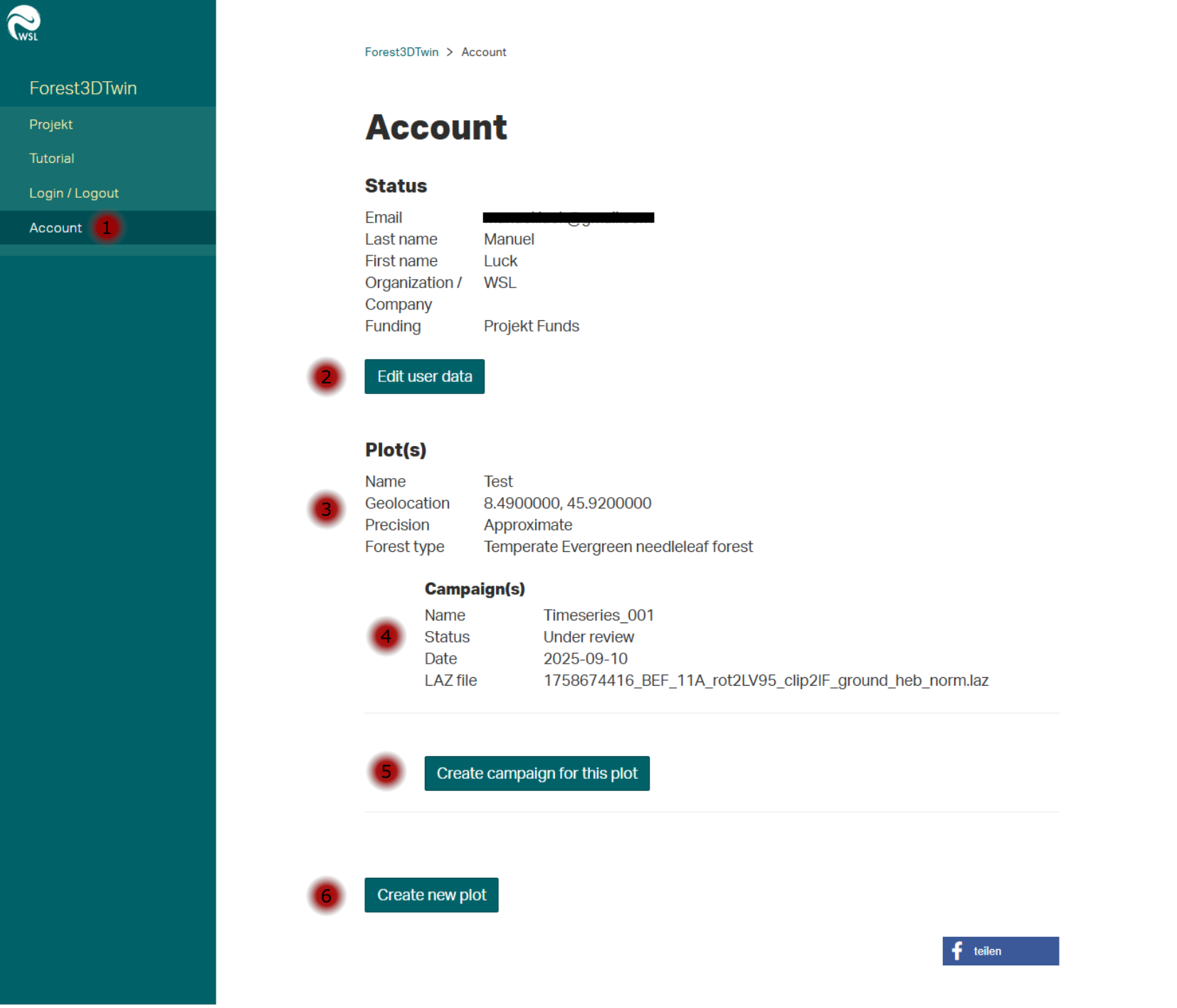
In the Account tab (1), the specified account data can be edited (2).
The existing plots (3) are listed under Plot(s).
If a plot already contains a campaign, the following attributes are displayed:
- Campaign name
- Campaign date
- Laz file name
- Status of the review process
Furthermore, new campaigns can be added to existing plots (5) or new plots can be created (6).
Plot form 
During the beta, the metadata query is limited to the mandatory fields. In future versions, additional optional fields will be added to describe the data. Input on possible fields is always welcome and can be sent to project members (see Project/Collaborators).
- Name: A suitable name for the plot, e.g. the name of the forest in which the data was collected. An entry is created on Envidat under this name.
- Geographical coordinates: Currently two input fields for latitude and longitude, in a future version an interactive map should save copying the coordinates.
- Precision: Here you can choose between Approximate and Precise. This option is available so that data for which you are not allowed to enter the exact position can still be displayed on Envidat.
- Buffer: Buffer indicates the radius from the specified position in which the survey area is located.
- Forest Type: A selection of common forest types.
- License: Suggestions of different license types with which the data should be published. If the data is not to be published with one of the specified licenses, the desired license can be added in the following field. In this case, it is important that both the title of the license and a URL are specified. Otherwise the license cannot be displayed correctly on Envidat. Format: License title, URL.
Future metadata:
- Average height above sea level.
- Forest development stage
- Dominant tree species
- Forest management
- Plantation
- Climate according to Köppen-Geiger
- Related publications
Campaign form 
The campaign form is used to record the circumstances under which the data was recorded and to upload the corresponding point cloud files (.laz) and trajectories/scan positions (csv).
Current metadata for the campaigns:
- Name: Date, name and sensor platform together make up the heading of the campaign tile on Envidat.
- Date: Date of the recording.
- Sensor platform: Choice between TLS, UAV-LS and various MLS.
- Georeferencing: Whether the point cloud is stored in local coordinates or georeferenced.
- Vegetation period: Whether the data was recorded during leaf-on or off.
Future metadata:
- Recording information
- Timeseries
- Sensor information
- Sensor names
- PRF
- Scan angle
- Flight altitude
- Scan pattern
- Scan resolution
- Number of scans
- Distance between scan positions
- Vegetation information
- Vegetation status
- Start of vegetation season
- End of vegetation season
- Weather information
- Wind
- Precipitation
- Additional information
- Additional tags
- Description
Envidat project page 
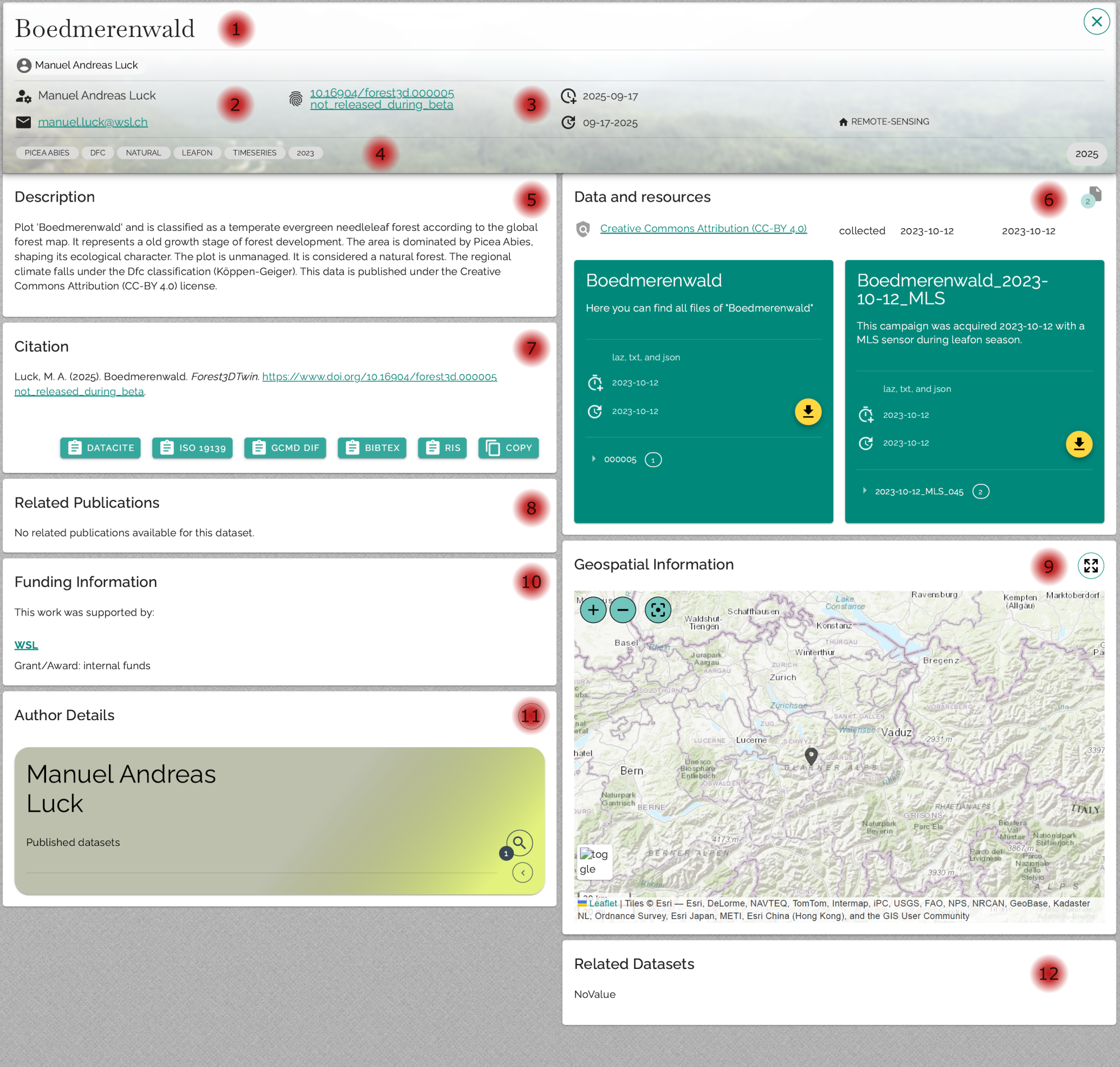
Plot name & authors:
Name of the plot as it was assigned when it was created on forest3dtwin.wsl.ch, including contact details of the responsible persons.Maintainer:
Responsible person in the Forest3DTwin team, including contact details.DOI:
Each plot receives its own DOI, which will be published after the beta phase of the project has been completed.Tags:
Keywords by which the datasets can be filtered. The focus here is on the metadata of the plots, not the campaigns. Important properties from the campaigns (e.g., whether TLS or MLS was used) are also listed as tags.Description:
The plot description is automatically generated from various metadata.Data:
All campaigns are listed under "Data and resources".
Each campaign appears as a separate tile with a short description, start and end date, and a list of all associated files.Raw data: Contains the .laz file and the associated position file.
Metadata: Contains the description.json file with all metadata specified during upload.
In addition, there is a tile that summarizes all campaigns to enable a faster download.Citation:
Specifies how the dataset should be correctly cited.Publications:
List of publications linked to the dataset that were specified during upload.Funding:
Information on how the data collection was funded.Author details:
Detailed information on the authors, as well as links to other datasets.
Map overview:
Map showing the location of the study area. If no georeferencing is available, the approximate position specified when the plot was created is displayed.- Related datasets:
Links to other datasets that are related in terms of content, according to the author.